Creator Tips
Why Your Email List Is Your Most Valuable Asset (And How)
July 14, 2026
Stop juggling content ideas across a dozen tools—discover how iBuildInfluence's Content Pipeline keeps every project organized and moving forward. Learn the one system that gives creators complete visibility over their workflow and prevents brilliant ideas from disappearing into the chaos.
Think of the Content Pipeline as a digital Kanban board designed specifically for creators. It's a centralized hub where every single content idea—whether it's a YouTube video, short-form reel, or long-form article—lives and moves through distinct stages of production. Instead of bouncing between multiple tools and platforms, everything exists in one organized space.
The real power of the Content Pipeline lies in visibility and control. At any given moment, you can see exactly where each piece of content stands. Is it still in the idea phase? Waiting for a product to arrive? Stuck in the editing queue? You'll know instantly. This transparency is what prevents ideas from slipping through the cracks and what keeps your creative momentum strong.
For creators managing their own business, this system is invaluable. Rather than maintaining multiple to-do lists, notepads, or whiteboard scribbles, you have a single source of truth for your entire content operation.
Centralized Organization: All your content ideas live in one spot instead of scattered across apps and note-taking tools.
Easy Ideation Capture: Jot down a new idea, save it, and expand details as the project progresses.
Visual Workflow: See the entire production journey at a glance with a clear column-based layout.
Bottleneck Prevention: Identify content stuck in any stage and take action to keep things moving.
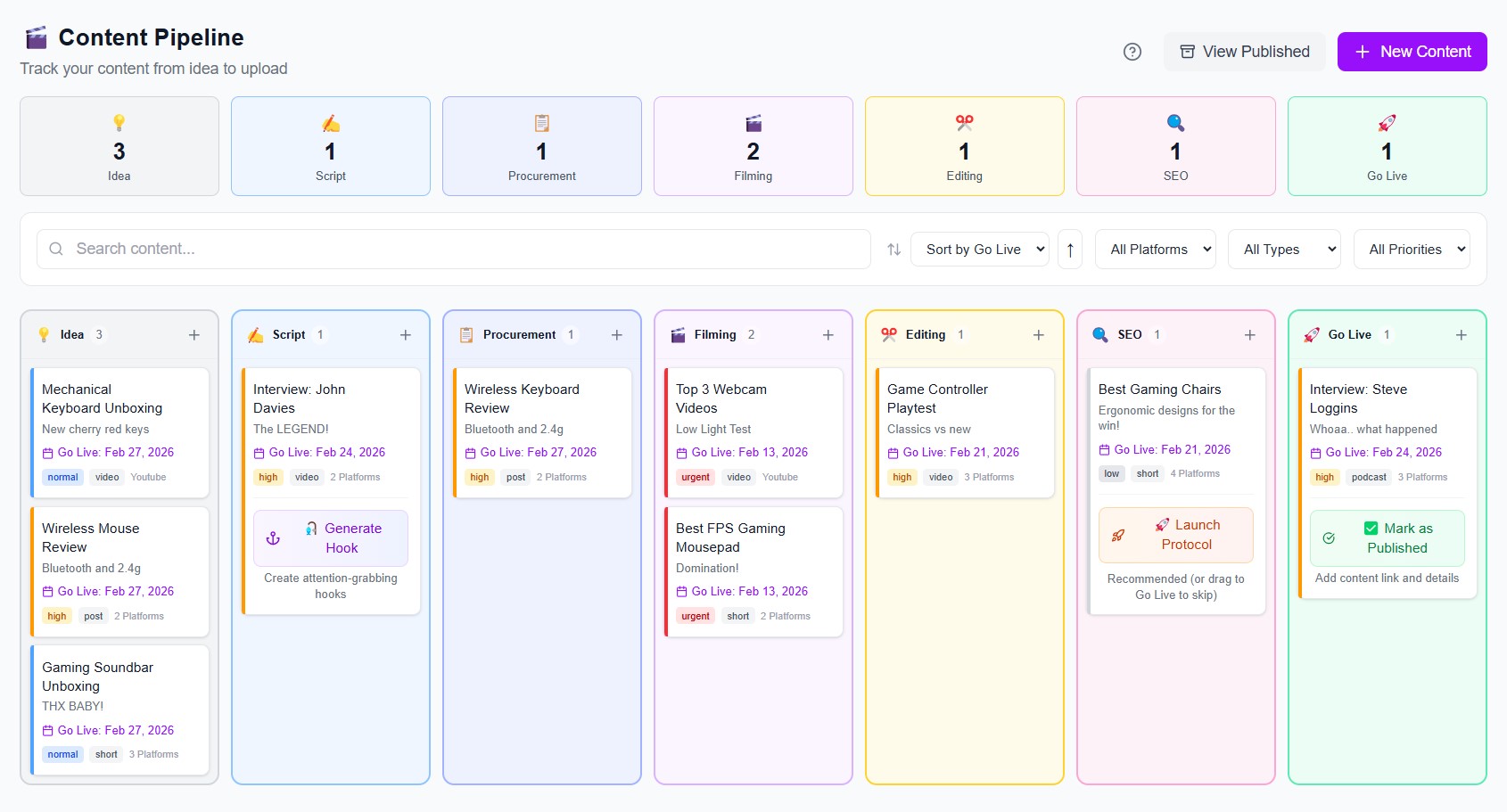
The Content Pipeline operates across seven key stages, each representing a critical phase of content production. Moving content through these stages is as simple as dragging and dropping cards, making the entire workflow frictionless.
Let's break down each stage and what happens there:
Idea: This is where raw concepts live. You've thought of a video topic, and you capture it here with basic details about what type of content it is.
Script: Your idea now has structure. Whether you're writing a detailed script or working from bullet points, this is where the narrative takes shape.
Procurement: For content that requires physical products or resources, this stage tracks waiting periods. If you're filming a product review and the product hasn't arrived yet, it sits here.
Filming: The camera is rolling. Your content is actively being produced in this stage.
Editing: Post-production begins. Raw footage becomes polished, finished content ready for distribution.
SEO: Before going live, your content undergoes optimization. Titles, descriptions, tags, and thumbnails are refined to maximize discoverability.
Go Live: The moment of truth. Your content is published and marked as complete in the system.
What makes this structure so effective is that each stage has a clear purpose. Content doesn't arbitrarily sit in limbo—it's deliberately placed in a stage based on what's actually happening with that project.
The fundamental unit of the Content Pipeline is the content card. Each card represents one piece of content and travels through the pipeline as you work on it. Creating a card is straightforward and packed with useful metadata options.
As you're thinking through your ideas, you can immediately create a card. You can put notes in here about what type of video it is—whether it's a short, a reel, or long-form content—set a priority level, propose a go-live date, and even attach files like scripts or contracts.
When you create a card, you have several customization options at your fingertips. You can specify the content type (YouTube video, Instagram Reel, TikTok short, etc.), add detailed notes and descriptions, set priority levels to identify which content matters most, assign a target go-live date, and attach supporting files and documents.
This rich information layer means that when you or a team member picks up the card later, they have all the context needed to move forward without asking questions. For creators running brand deals or collaborations, you can even attach contracts and approval documents directly to the card.
One of the biggest advantages of using the Content Pipeline is how it connects seamlessly with other features in the iBuildInfluence platform. As you progress through stages, you can instantly leverage specialized tools to accelerate your workflow.
For example, when a card reaches the Script stage, you might need creative help with hooks—the opening lines that grab your audience's attention. Instead of leaving the platform, you can jump directly into Hook Lab from your card. Hook Lab automatically pulls all the details from your card and generates multiple hook options tailored to your content type. Once you've selected your best hook, you can link it back to the card for reference.
Similarly, when content reaches the SEO stage, the system offers different optimization checklists depending on your content format. For longer-form content, you'll see a comprehensive checklist covering:
Title optimization: Crafting titles that are both compelling and search-friendly.
Thumbnail design: Visual elements that encourage clicks.
Tag strategy: Relevant tags that improve discoverability.
Description copy: Well-written descriptions that convert viewers.
Metadata details: All the backend information that search engines and algorithms evaluate.
This integrated approach means you're not context-switching between tools. Everything you need is connected, reducing friction and keeping you focused on creating great content.
The Content Pipeline solves a psychological challenge every creator faces: the overwhelming feeling of having too many projects in their head at once. When ideas aren't captured and organized, two things happen: either you forget them entirely, or you experience constant mental load trying to remember where everything stands.
By moving everything into its own column at its different stages, you know exactly where everything is at all times. This structure helps you progress content without losing anything and even sends reminders when something's stuck in the pipeline and needs help to keep moving.
The system actually works as a progress tracker and accountability partner. If a video has been sitting in the Editing stage for three weeks, the system alerts you. This prevents the common scenario where a nearly-finished video gets forgotten and never sees the light of day. For creators trying to maintain consistent publishing schedules, this visibility is essential. Beyond preventing loss, the pipeline structure creates psychological relief. Rather than carrying every idea in your head, you've externalized them into a system you trust. This frees up mental energy for actual creative work instead of project management.
Implementing the Content Pipeline in your workflow is simple. Start by dumping all your current ideas into the Idea column—don't worry about perfect descriptions yet, just get them out of your head and into the system. Then, for any content already in progress, place those cards in their appropriate stages based on what work remains. Once you have your current projects mapped, begin using the pipeline for all new content going forward. Make it a habit to capture ideas the moment they strike, rather than hoping you'll remember them later. The faster you can move content through stages, the more consistently you'll publish.
Access the Content Pipeline through the "Build My Consistency" tab in iBuildInfluence. If you need help navigating any feature or understanding how different tools connect, click the question mark icon in the top right corner for a complete feature overview.
-The Content Pipeline is a Kanban-style system that centralizes all your content ideas and tracks them from ideation through publication.
-Seven distinct stages (Idea, Script, Procurement, Filming, Editing, SEO, Go Live) provide clarity about where each project stands.
-Content cards are customizable and can include notes, file attachments, priority levels, and target dates for maximum context.
-Integration with other iBuildInfluence tools like Hook Lab and SEO checklists keeps you in one place throughout your workflow.
-Systematic organization prevents bottlenecks and sends alerts when content gets stuck, ensuring consistent progress toward publication.
-Structured workflows reduce mental load and allow you to focus creative energy where it matters most.
Content creation doesn't have to feel chaotic. The Content Pipeline transforms the scattered nature of creative work into a predictable, visible, and manageable process. Whether you're a solo creator managing dozens of ideas or part of a team coordinating multiple channels, having a single system that tracks every piece of content from spark to publication is transformational.
Start today by visiting iBuildInfluence.com, accessing the Content Pipeline, and creating your first few content cards. Capture those ideas that have been floating in your head, map your in-progress projects, and experience the clarity that comes from knowing exactly where everything stands. Your future self—and your publishing schedule—will thank you.
Found this helpful? Share it:
iBuildInfluence Team
Creator growth strategist at iBuildInfluence. Helping content creators land brand deals, grow their audience, and build sustainable creator businesses.
More from iBuildInfluenceJoin thousands of creators using iBuildInfluence to land brand deals, grow their audience, and build real income.
Start Free ΓÇö No Credit Card Required