
Platform Growth
How Small Channels Can Beat Big Creators (Smart Strategies)
July 25, 2026
Learn a practical system to repurpose one YouTube video into 30+ posts—hooks, clips, carousels, scripts, and schedules you can reuse.

Most creators treat one YouTube upload like a one-time event. It isn’t. With the right content creator workflow, you can turn a single video into a month (or more) of posts—without rerecording everything.
In this guide, you’ll learn an actionable system to produce 30 pieces of content from one YouTube video, using templates for clips, posts, newsletters, and even offer-ready assets.
Before you clip anything, decide what “30” actually means for your channel and audience. A common mistake is extracting random moments and hoping they perform. Instead, build a blueprint around outcomes: awareness, trust, engagement, and conversion.
Here’s a practical 30-piece mix you can repeat for any video topic:
12 short-form clips (8–25 seconds each) for Shorts/IG Reels/TikTok; 6 social posts (carousel or text); 4 quote cards (one idea per card); 3 long captions (thread-style or blog-style); 2 email sends (newsletter or lead magnet follow-up); 2 “how-to” assets (checklist or mini-template); 1 community post + 1 pinned comment script. That’s your base system—then you map your video sections to these outputs.
Quick example: If your video is “How to Transition From Side Hustle to Full Time,” you can allocate clips to: (1) the mindset shift, (2) income math, (3) weekly routine, (4) risk management, (5) the first 90 days. Each clip becomes a standalone content promise, not a random cut.
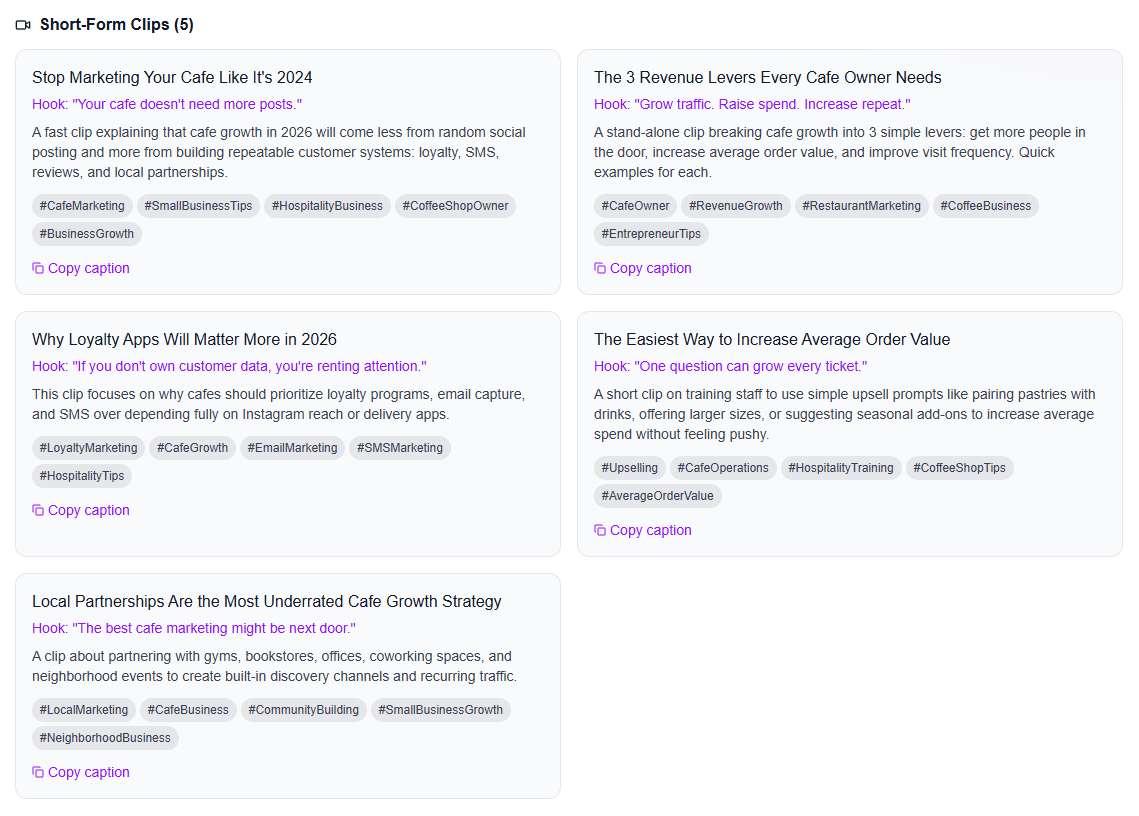
iBuildInfluence's content generator also suggests how to make your video into multiple clips to help multiply the content.
Your video already contains the raw material—what you need is a method to package it. Watch once and tag segments with timecodes. Then write a one-line “nugget” for each segment that explains what the audience will learn or feel.
Use this tagging structure:
Nugget A (Hook): the first 30–60 seconds of your video (what problem you address).
Nugget B (Authority): a stat, myth-bust, or experience story.
Nugget C (Steps): your main framework—usually 3–7 steps.
Nugget D (Examples): demos, before/after, case study, or script.
Nugget E (Common mistakes): what to avoid.
Nugget F (CTA): the “do this next” moment.
Now convert each nugget into multiple pieces. A single “steps” section might yield: 1 Shorts clip, 1 carousel slide set, 1 quote card, and 1 long caption post. This is how you get volume without repeating effort.
Real-world repurposing math: If you capture 10 high-value nuggets and each nugget becomes 3 different outputs, you’re at 30. The trick is ensuring your nuggets are “modular”—each can stand alone. A tip: if a nugget requires the previous nugget to make sense, rewrite the nugget caption before posting.
Shorts (and Reels/TikTok) work when viewers instantly understand the payoff. Your clips should include context, not just silence followed by a sentence. For each of your 12 Shorts clips, aim for a structure that matches how people watch on mobile:
0–2s: big problem statement (“If you’re still stuck in side hustle mode…”)
2–8s: the key idea (“You don’t need more motivation—you need weekly revenue targets.”)
8–20s: one actionable step (“Calculate your baseline expenses, then reverse-engineer sales.”)
20–25s: CTA (“Comment ‘MATH’ and I’ll send the breakdown.”)
Even if you’re cutting from the same video, you can adjust delivery using on-screen text, a different intro line, or a quick “framing” overlay. That “framing” is what makes the clip feel new. It also supports the YouTube algorithm 2026 reality: engagement signals (retention, re-watches, and comment rate) matter more than whether the clip is “original” in the absolute sense.
Practical workflow: For each clip, write a one-sentence caption that repeats the promise, plus a pin-comment that adds specificity. Example pin comment: “Baseline expenses + realistic conversion rate = your weekly sales number. I’ll share the template if you DM ‘TARGETS’.” This drives conversation and gives you content for the next post.
Short-form alone won’t build a sustainable funnel. To turn a single YouTube video into an engine, you need middle-of-funnel assets (save/share content) and bottom-of-funnel assets (conversion content).
Here’s how to generate the remaining 18 pieces from your video nuggets.
Carousels (6 pieces): Convert each into “one framework, one screenshot-able takeaway.” Slide 1 is a hook, slide 2–5 are steps, slide 6 is a checklist, slide 7 is a soft CTA. Example carousel topic from a video: “The 7-step transition plan: Mindset → Budget → Skills → Offer → Outreach → Execution → Review.”
Quote cards (4 pieces): Pull the most memorable lines and pair them with a counterintuitive insight. Quote cards perform when the text is short enough to read instantly and the message is specific (“Posting more isn’t the answer; targeting the right audience is”).
Long caption posts (3 pieces): Turn your “steps” section into a mini-blog post. Use formatting people actually read: short paragraphs, bold key phrases, and one example story. If you’re trying to increase views and retention, long captions also help the external conversation around your YouTube upload.
Email sends (2 pieces): Email is where the relationship compounds. Send #1 as “What this video taught me” with a summary and a single next step. Send #2 3–5 days later as “Download/Template” or “Common mistakes” from the video. If you’re building an email list, this is where you can tie into why your email list is your most valuable asset (and how).
Offer-ready assets (2 pieces): Don’t just repurpose—package. If your video includes a process, turn it into a checklist, template, or mini-guide. For example, transform your “90-minute batch workflow” section into a one-page schedule you can sell or share as a lead magnet. This supports creators who want passive income for content creators later via assets. You can also map this to what to sell as a creator: 10 digital product ideas that sell.
Repurposing is not a one-and-done task. Your first pass will include clips that underperform and posts that unexpectedly overperform. The win is that you now have “content options” to learn from quickly.
Set up a simple measurement plan for 2 weeks:
Track per piece: views (or reach), engagement rate (likes/comments/saves per view), and “next action” signals (clicks, replies, DMs). If you’re posting across platforms, you want consistent metrics so you can compare formats.
Repeat what works: If one Shorts clip earned unusually high re-watches, extract a new clip from the surrounding timecode and make a “Part 2” framing post. If a carousel got saves but low comments, rewrite the caption to ask a more specific question (“Which step are you stuck on: offer, outreach, or execution?”).
This is where a content creator business plan-style approach matters: you’re turning one video into an experiment set. Over time, you’ll learn your audience’s “modular” triggers—what topics are save-worthy, what steps create comments, and what CTAs convert.
If you want a practical starting point, follow this rule: After 10 days, select the top 20% performers and create 10 more variations from the same nugget set. That’s how creators scale output without constantly rethinking their entire content strategy.
Your best repurposing strategy isn’t “making more content”—it’s making your ideas modular so one video can power many conversations.
Repurposing is easier when you manage the whole content system—planning, hooks, scheduling, and performance—without juggling spreadsheets and random docs. With iBuildInfluence, you can generate a full repurposing package from your video topic using the Content Generator to draft scripts, captions, and post copy so your “nuggets” turn into finished assets faster. This also suggests how to use the multiplied content on Instagram, Newsletters, Linked-in and shorts!
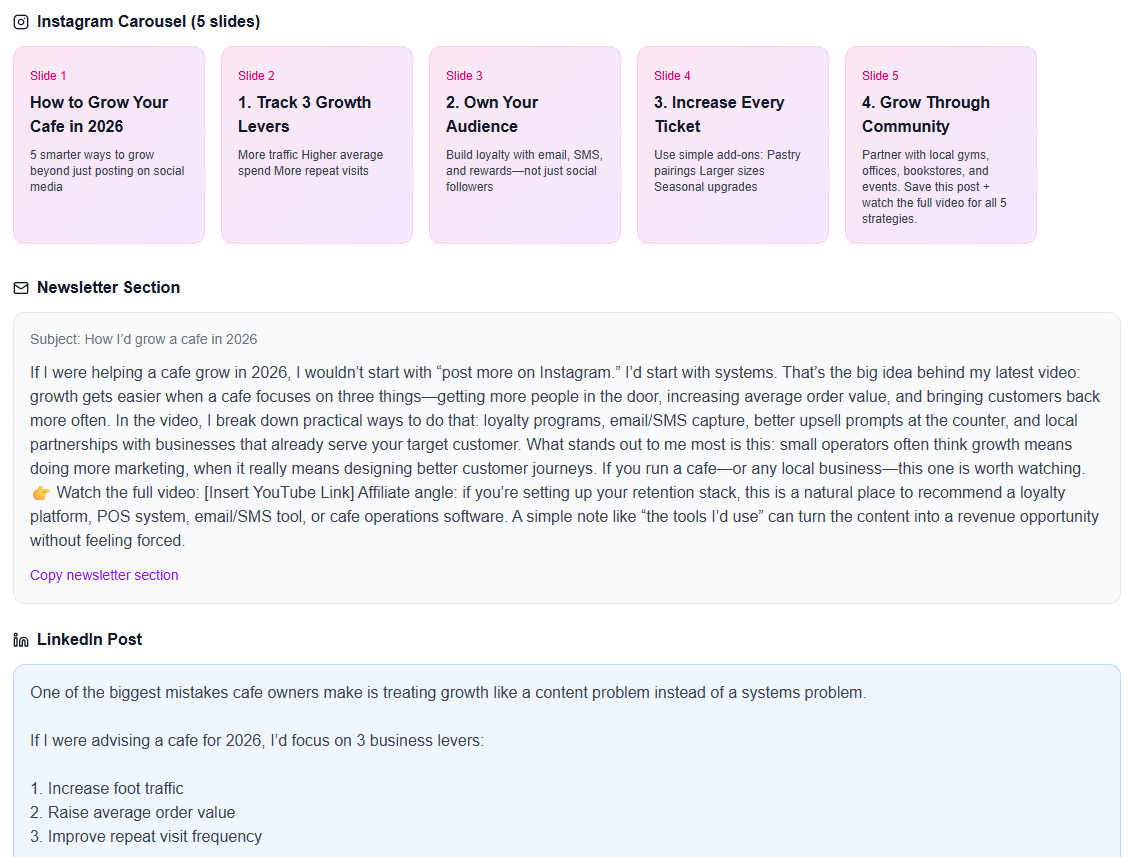
To make your Shorts and posts perform, you can use Hook Lab to produce and score strong hooks for your specific topic (so your clips don’t start weak). Then, you can plan and auto-schedule outputs using Content Planner & Content Queue, and measure what earned engagement with Social Statistics across platforms—helping you iterate the pieces that actually move the needle. (Plans start at $9/month with a 30-day free trial.)
Cut multiple clips from different timecodes, but add framing: a new first-line hook, on-screen context, and a CTA tailored to that nugget. Aim for one clear takeaway per Short. When done right, viewers feel each clip stands alone, even if it’s sourced from the same video.
Use a repeatable format list (12 Shorts, 6 carousels, 4 quote cards, 3 long captions, 2 email sends, 2 offer assets, plus 1 community post and 1 pinned comment). Then map 10 content nuggets from your video into 3 outputs each. This modular approach prevents “random repurposes” and keeps everything coherent.
For creators using templates, it’s often 3–6 hours for the first repurpose cycle. Your speed improves after the first run because you reuse hooks, caption structures, and scheduling workflows. If you’re doing it manually with no system, it can take much longer—so build your process once and iterate.
Decide your 30 formats first, then extract nuggets from your video to fill them.
Tag segments by timecode (hook, authority, steps, examples, mistakes, CTA) to keep ideas modular.
Make Shorts feel native with framing, on-screen context, and one clear takeaway.
Repurpose beyond social with emails and offer-ready assets (checklists/templates) to drive conversion.
Track and iterate using engagement and “next action” signals so you create more of what works.
Found this helpful? Share it:
iBuildInfluence Team
Creator growth strategist at iBuildInfluence. Helping content creators land brand deals, grow their audience, and build sustainable creator businesses.
More from iBuildInfluenceJoin thousands of creators using iBuildInfluence to land brand deals, grow their audience, and build real income.
Start Free ΓÇö No Credit Card Required