
Content Strategy
Why Posting More Isn’t the Answer: Grow Smarter in 2026
July 9, 2026
Stop letting AI sand off your edge. Build a voice system first, then use AI to generate in your exact style—hooks, scripts, captions—without losing what your audience loves.

Audiences don’t follow “content.” They follow a person with a distinct perspective, energy, and taste. If AI writes everything from scratch, it often smooths out your sharp edges—your opinions, your humor rhythm, your unique phrasing. That’s why the first rule is simple: AI should be an assistant, not the author you hide behind.
Start by building a “voice system” before you generate anything. Write a one-page creator style guide covering: your typical sentence length (short/long), your favorite openings, whether you use contractions (“you’re”), your “take” on controversial topics, and your taboo phrases (anything that sounds like corporate marketing). Then feed that into every workflow you use—scripts, captions, YouTube intros, email subject lines. For example, if you’re known for direct one-liners, require AI to produce 3 hook variations in your exact style, and only then you choose one.
Next, keep a mandatory “human signature” step. No matter how good the AI output is, you must edit in at least one of: a personal anecdote, a specific number from your experience, a “why I believe this” statement, or a story from your process. This is what keeps your content from blending into the background. A practical benchmark: if your post could be swapped with a different creator and nobody would notice, you’ve likely lost your voice.
AI is excellent for drafts, outlines, and alternative versions. It’s less reliable for accuracy, nuance, and context—especially when your audience expects you to be credible. If you want to use AI without losing your audience, don’t skip the trust-safety review. Think of it like quality control in a creator production pipeline.
Apply a three-pass review system to every AI-assisted piece of content:
Pass 1: Facts & numbers — Verify stats, dates, claims, and product specifics. If you mention performance numbers (e.g., “retention improved by 18%”), confirm the source or reframe it as “in my tests.”
Pass 2: Intent — Ask: “Does this read like me helping, or like me promoting?” Remove fluff. Replace vague statements (“this works for everyone”) with your reality (“this worked for my niche of X”).
Pass 3: Audience fit — Read it as a stranger. Would a skeptical follower still feel respected? If your tone sounds defensive, overly hype-y, or overly generic, revise.
Here’s a real example: Suppose you want a YouTube script about “how to get more views.” AI can generate an outline fast, but you should add your YouTube algorithm 2026 perspective only after you’ve checked your channel data. You can also test phrasing: write two versions of the intro—one concise and one story-driven—then measure retention or early engagement. People don’t mind that AI helped you. They mind when the content feels like it wasn’t made for them.
Transparency is delicate. Too much disclosure can make your audience suspicious (“Wait, who wrote this?”). Too little can backfire if people later suspect you’re using AI to mask low effort. The goal isn’t to announce every tool you touch; it’s to communicate your process and responsibility.
A good middle approach is to be transparent about outcomes and effort, not every keystroke. For example, you might say: “I used AI to generate draft concepts, then I rewrote the script in my voice and fact-checked the details.” This signals you didn’t abdicate judgment. If you’re creating tutorials, keep your trust by demonstrating your method (screen recordings, step-by-step actions, your exact settings). If you’re writing personal reflections, keep AI mostly in the “structure” lane and do the “thought” lane yourself.
Also, consider what you publish vs. what you use AI for internally. Many creators keep AI in the background for ideation, repurposing, and planning. A transparent practice you can adopt: only let AI draft public content after it passes your trust-safety review. For anything you wouldn’t stand behind publicly—hot takes, sensitive topics, or medical/financial advice—don’t delegate the final recommendation to AI. Maintain your accountability.
When AI enters your workflow, your output changes—even if you keep your voice. The real question becomes: does it improve performance in your audience’s eyes? Use analytics to decide whether AI is helping or harming. Social platforms reward retention, relevance, saves/shares, and consistent satisfaction signals, not just readability.
Try this 14-day experiment mindset: create two content batches that are similar in topic and format. Batch A: fully human (your baseline style). Batch B: AI-assisted with your voice system and trust-safety review. Then compare performance metrics that match the platform and your goal. For Instagram and short-form video, track engagement rate and completion/rewatch signals. For YouTube, focus on early retention and impressions click-through—these are often tied to your hooks. For blog posts, look at time on page, scroll depth, and conversion actions.
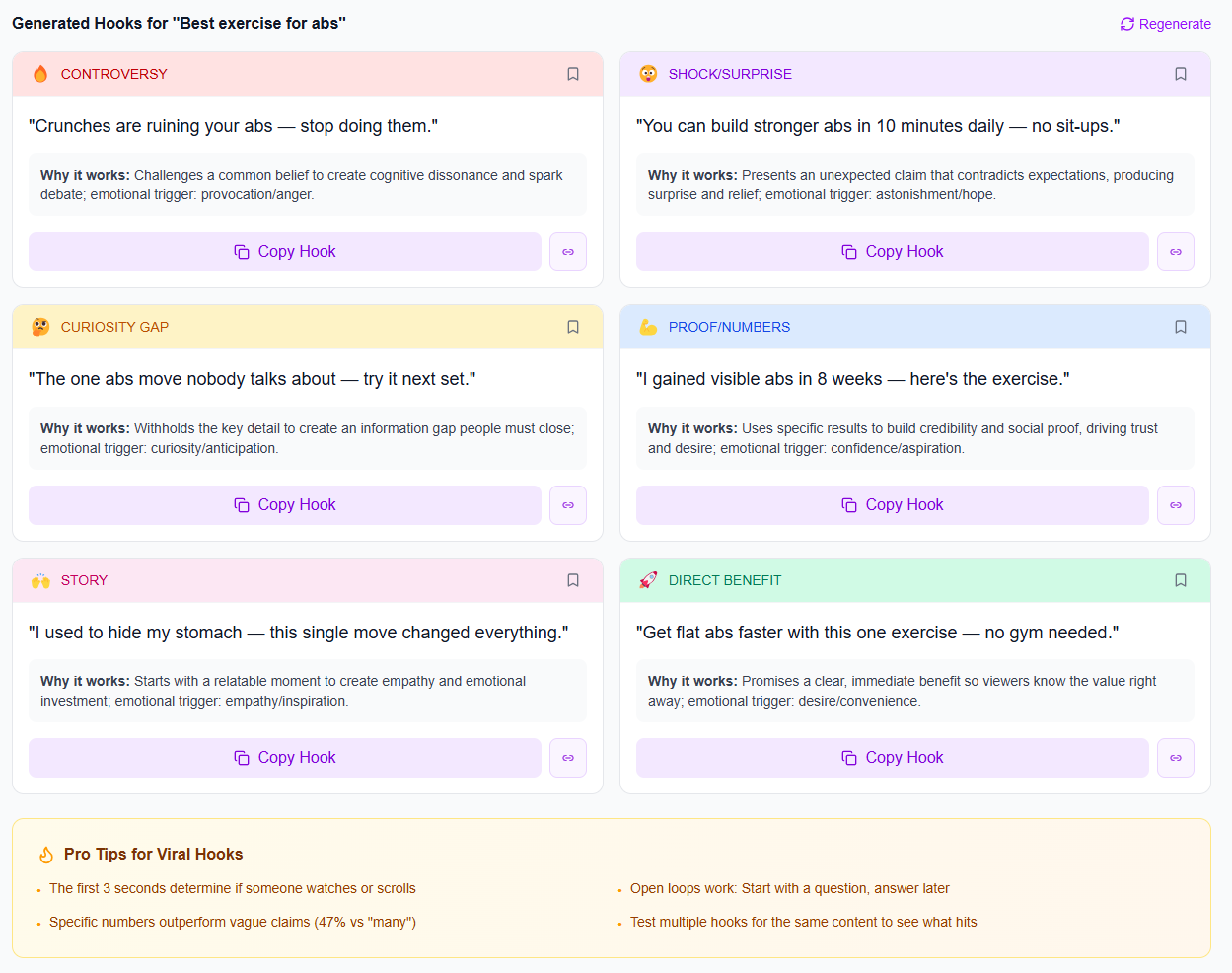
If you’re wondering how AI affects the YouTube algorithm 2026 specifically, remember that the algorithm ultimately amplifies content that holds attention and earns satisfaction. AI can help you generate better hooks and clearer structures, but your audience retention is still determined by pacing, clarity, and why the viewer should care now. That’s why you should A/B your hooks at the top of the funnel and keep the rest consistent.
If performance drops, don’t blame AI immediately. Look for the failure mode: Did you remove your personal example? Did you broaden the topic too much? Did the intro become generic? Tighten your “signature” step and run another batch. Data turns subjective anxiety into a clear decision.
The fastest way to lose your audience isn’t using AI—it’s using it inconsistently. If every post suddenly feels “off,” viewers sense it even when they can’t explain it. A stable content creator workflow keeps your pacing, formatting, and storytelling rhythm predictable. That’s how trust is maintained.
Here’s a practical workflow you can adopt this week:
Step 1: Trend & topic selection — Pick 3–5 topics your audience is already searching for. Use trending discovery so your ideas aren’t based purely on what feels trendy in your feed.
Step 2: Hook creation — Generate 10–20 hook ideas, then score/select only the ones that sound like you.
Step 3: Draft structure — Use AI to create a first outline (not a final script). Your job is to add your examples, stories, and takes.
Step 4: “Signature insert” — Add one personal detail per post: your lesson, your mistake, your data point, or your behind-the-scenes moment.
Step 5: QA review — Facts, intent, and audience fit (the three-pass system).
Step 6: Publish + measure — Track engagement and retention. Then iterate your hooks and structure.
One more guardrail: keep your “AI output ceiling” realistic. AI should help you reach your standard faster, not reach for a different standard. If your audience loves your short, punchy style, don’t start posting long monologues because AI generated them. Your format preferences are part of your brand identity.
The audience doesn’t hate AI. They hate feeling like you stopped caring. Your job is to use AI to protect your consistency—then add your humanity where it matters most.
iBuildInfluence supports an AI-assisted process without turning your channel into a template factory. For hook and script quality, you can use Hook Lab to generate multiple hook options and score them by performance potential—then you choose the ones that match your voice instead of accepting the first draft. For topic direction, Trend Scout helps you find what’s rising before it peaks, so your audience sees relevance, not randomness.
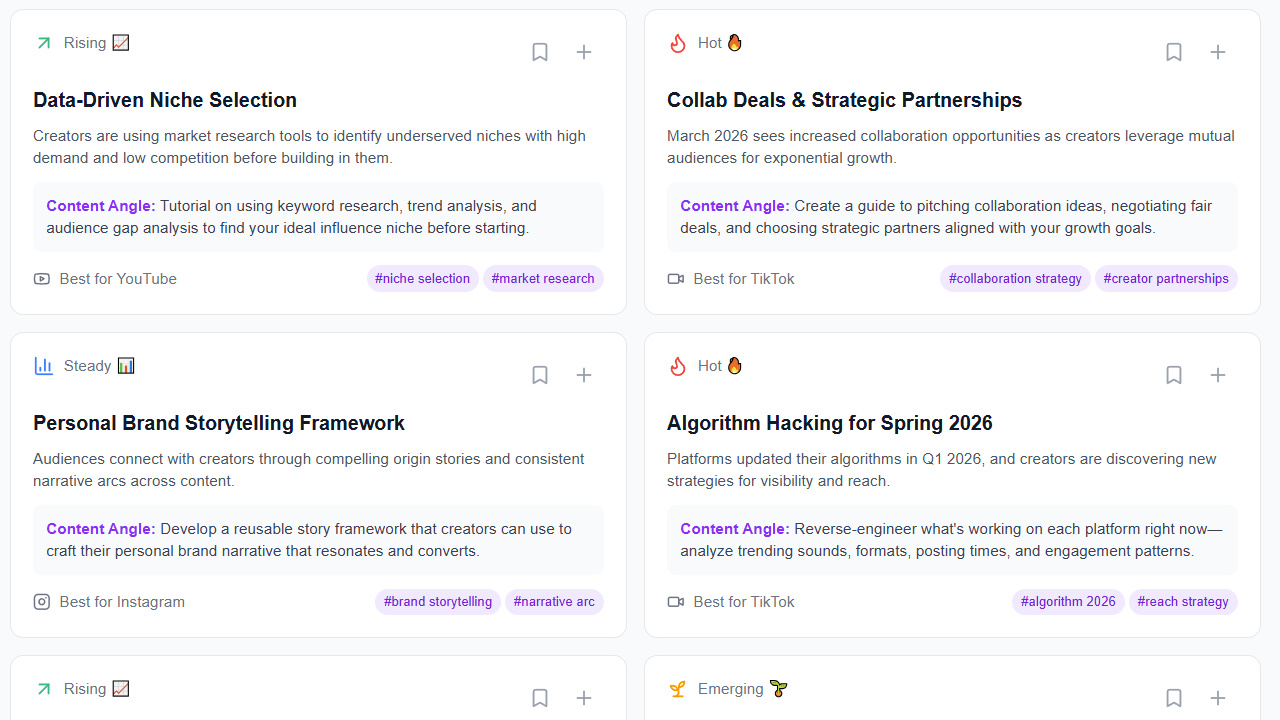
To keep your workflow consistent (and therefore audience-friendly), iBuildInfluence also offers Content Planner & Content Queue to map weeks of content and auto-schedule, reducing the “random posting” problem that makes AI output feel disconnected. After publishing, Social Statistics gives cross-platform analytics so you can measure whether AI-assisted content actually improved engagement rate, reach, and saves/shares—then refine based on evidence, not guesses.
It can, if you publish AI-written drafts without adding your signature examples and opinions. Authenticity comes from your perspective, specificity, and accountability—not from writing style alone. Use AI to speed up structure and ideation, then edit in your real stories and data.
Generate multiple hook variations, then filter them through your creator voice rules (tone, sentence length, humor rhythm). Keep a “human signature” in the first 1–2 lines—an opinion, a personal lesson, or a specific outcome. Finally, test different hooks and measure early retention or click-through.
Track platform-specific performance: engagement rate and saves/shares for social, early retention and impressions click-through for YouTube, and time on page/scroll depth for blogs. Compare AI-assisted batches to your baseline to identify what changed. If performance drops, revise the voice or the content structure first, not just the tool settings.
Protect your voice with a personal style guide and a required “human signature” edit on every post.
Use AI for drafting and speed, then run a trust-safety review (facts, intent, audience fit).
Maintain accountability—be transparent about process without turning your workflow into oversharing.
Measure performance with real metrics to confirm AI improves retention, engagement, and satisfaction.
Build a consistent AI-assisted workflow so your audience feels continuity, not randomness.
Found this helpful? Share it:
iBuildInfluence Team
Creator growth strategist at iBuildInfluence. Helping content creators land brand deals, grow their audience, and build sustainable creator businesses.
More from iBuildInfluenceJoin thousands of creators using iBuildInfluence to land brand deals, grow their audience, and build real income.
Start Free ΓÇö No Credit Card Required